Introduction: Why ATS Resume Format Matters More Than Ever
In today’s highly competitive job market, submitting a visually stunning resume is no longer enough. Most companies now rely on Applicant Tracking Systems (ATS) to filter, scan, and rank resumes before a human recruiter ever sees them. This is exactly why mastering the ATS Resume Format is essential for job seekers in 2026.
If your resume is not ATS-friendly, it may never reach the recruiter—no matter how qualified you are. Studies show that over 75% of resumes are rejected by ATS software due to formatting issues, keyword mismatches, or unreadable layouts.
This in-depth guide will teach you everything you need to know about the ATS Resume Format, including:
- How ATS software works
- Best ATS resume format for experienced professionals
- ATS resume format for freshers
- How to convert resume to ATS format step-by-step
- Common mistakes to avoid
- Tools, examples, FAQs, and SEO-optimized best practices
Whether you’re a fresher or an experienced professional, this article will help you create an ATS-optimized resume that actually gets interviews.
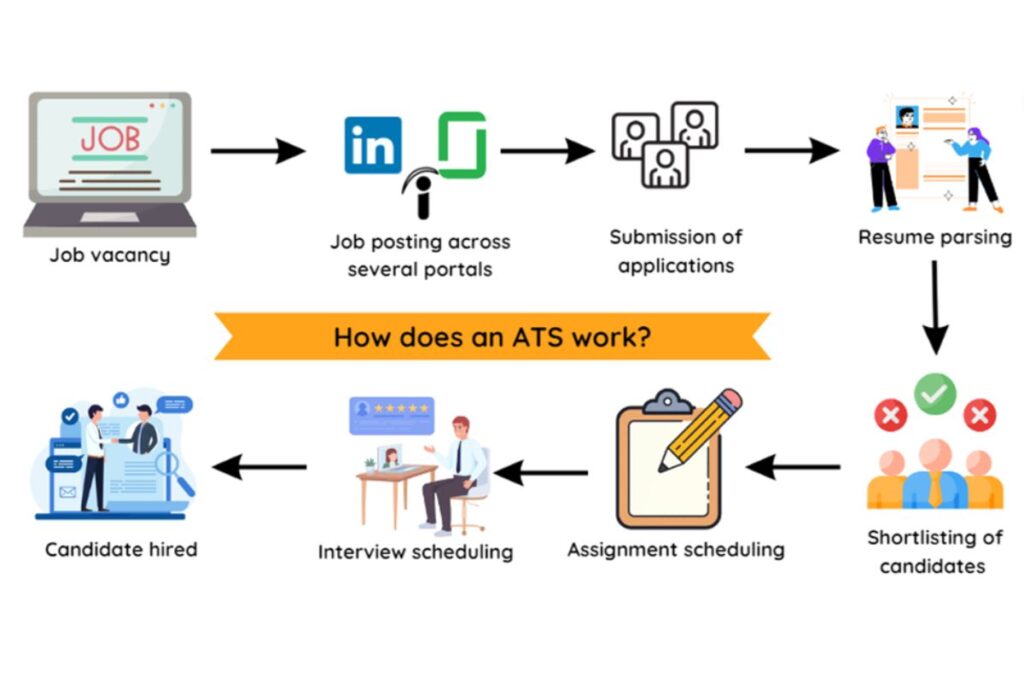
What Is an ATS (Applicant Tracking System)?
An Applicant Tracking System is software used by employers to manage job applications. It automatically scans resumes to extract data such as:
- Name and contact information
- Skills and keywords
- Work experience
- Education
- Certifications
The ATS then ranks resumes based on how closely they match the job description.
Why ATS Rejects Most Resumes
ATS systems reject resumes mainly because of:
- Complex formatting
- Graphics, tables, or columns
- Missing keywords
- Unsupported fonts
- Incorrect section headings
This is why using the correct ATS Resume Format is critical.
How ATS Resume Parsing Works (Simplified)
Understanding how ATS reads resumes will help you optimize better.
- Parsing – ATS converts your resume into plain text
- Keyword Matching – Compares resume keywords with job description
- Scoring – Assigns relevance scores
- Filtering – Rejects low-scoring resumes
If the ATS cannot parse your resume properly, your application ends there.
What Is an ATS Resume Format?
An ATS Resume Format is a resume layout specifically designed to be easily read and parsed by applicant tracking systems. It focuses on simplicity, clarity, and keyword optimization rather than visual design.
Key Characteristics of an ATS Resume Format
- Single-column layout
- Standard fonts (Arial, Calibri, Times New Roman)
- Clear section headings
- No graphics or icons
- Keyword-rich content
- Reverse-chronological structure
Best ATS Resume Format Structure (2026)
Below is the most effective ATS-friendly resume structure:
1. Header (Simple & Clean)
Include:
- Full name
- Phone number
- Professional email
- LinkedIn profile (optional)
Avoid: headers, footers, icons, images.
2. Professional Summary (Keyword-Optimized)
Your summary should:
- Be 2–4 lines long
- Include job title and core skills
- Match job description keywords
Example:
Results-driven Digital Marketing Specialist with 5+ years of experience in SEO, PPC, and content strategy. Proven ability to increase organic traffic and lead conversion.
3. Skills Section (Critical for ATS)
Use a bullet-point or comma-separated list.
Example:
- SEO Optimization
- Google Analytics
- Python
- Project Management
- CRM Tools
💡 Tip: Always match skills with the job posting.
4. Work Experience (Reverse Chronological)
Use this format:
Job Title
Company Name | Location
Month/Year – Month/Year
- Action-oriented achievement
- Use metrics (numbers, %)
- Include keywords
5. Education
Degree Name
University Name | Year
6. Certifications (Optional but Valuable)
- Google Data Analytics Certification
- AWS Certified Solutions Architect
ATS Resume Format for Experienced Professionals
The ats resume format for experienced candidates should emphasize achievements, leadership, and industry-specific skills.
Best Practices for Experienced Candidates
- Focus on accomplishments, not duties
- Use metrics (ROI, %, growth)
- Tailor keywords per job
- Keep resume within 2 pages
Example Achievement:
Increased system efficiency by 35% by optimizing backend processes.
ATS Resume Format for Freshers
The ats resume format for freshers should focus on skills, projects, internships, and education.
Key Tips for Freshers
- Use strong skills section
- Highlight academic projects
- Include internships and certifications
- Avoid irrelevant personal details
Example Project Entry:
Developed a Python-based inventory system that reduced manual errors by 25%.
How to Convert Resume to ATS Format (Step-by-Step)
If you already have a resume, here’s how to convert resume to ATS format easily:
Step 1: Remove Design Elements
- Delete tables, columns, graphics
- Remove icons and images
Step 2: Use ATS-Friendly Fonts
- Arial
- Calibri
- Times New Roman
Step 3: Use Standard Headings
- Work Experience
- Skills
- Education
Step 4: Optimize Keywords
- Copy keywords from job description
- Integrate naturally
Step 5: Save in Correct Format
- PDF (only if ATS allows)
- DOCX (safest option)
ATS Resume Formatting Rules You Must Follow
Do ✅
- Use bullet points
- Use simple language
- Use reverse chronological order
- Match job description keywords
Don’t ❌
- Use tables or text boxes
- Add images or logos
- Use fancy fonts
- Stuff keywords unnaturally
Best File Type for ATS Resume
| File Type | ATS Friendly |
|---|---|
| DOCX | ✅ Best |
| ⚠️ Depends on ATS | |
| JPG | ❌ No |
| HTML | ❌ No |
Common ATS Resume Mistakes to Avoid
- Keyword stuffing
- Using headers/footers
- Incorrect job titles
- Missing skills section
- Unreadable formatting
Avoiding these mistakes alone can increase your resume visibility by 60%.
ATS Resume Keywords: How to Use Them Correctly
Types of Keywords ATS Looks For
- Job titles
- Technical skills
- Soft skills
- Tools & technologies
- Certifications
Example Keyword Integration
Instead of:
Worked on marketing tasks
Use:
Executed SEO, PPC, and email marketing campaigns using Google Ads and HubSpot.
Best Tools to Check ATS Resume Compatibility
- Jobscan
- Resume Worded
- SkillSyncer
- Zety ATS checker
These tools simulate ATS scans and give optimization tips.
ATS Resume Format Example (Text Sample)
John Doe
john.doe@email.com | +1-234-567-8901

Professional Summary
Experienced Software Engineer with 6+ years in Python, APIs, and cloud infrastructure.

Skills
Python, Java, AWS, Docker, REST APIs

Experience
Senior Software Engineer
ABC Tech | 2019 – Present
- Improved system performance by 40%
- Led a team of 5 developers

Education
BSc in Computer Science
XYZ University
SEO, ATS & Recruitment Trends (2026 Stats)
- 99% of Fortune 500 companies use ATS
- 70% resumes fail ATS due to formatting
- Keyword-optimized resumes get 2× more interviews
(Source: HR Tech Research 2024)
FAQs: ATS Resume Format (Schema-Friendly)
❓ What is the best ATS Resume Format?
The best ATS Resume Format is a single-column, text-based resume with standard headings, keywords, and no graphics.
❓ Can ATS read PDF resumes?
Some ATS can, but DOCX is safer. Always check employer instructions.
❓ Is ATS resume format different for freshers?
Yes. ATS resume format for freshers focuses more on skills, education, and projects rather than experience.
❓ How many keywords should I use?
Use keywords naturally. Maintain 1–2% keyword density to avoid rejection.
❓ How do I convert resume to ATS format?
Remove design elements, use standard headings, optimize keywords, and save as DOCX.
Final Checklist Before Submitting Your ATS Resume
✔ Keywords matched
✔ Simple formatting
✔ Correct file type
✔ No images or tables
✔ Tailored for job role
Conclusion: Master ATS Resume Format & Get More Interviews
In 2026, understanding and implementing the ATS Resume Format is no longer optional—it’s mandatory. Whether you are an experienced professional or a fresher, an ATS-optimized resume dramatically increases your chances of landing interviews.
By following this guide, you now know:
- How ATS systems work
- The best ats resume format for experienced professionals
- The ideal ats resume format for freshers
- How to convert resume to ATS format effectively